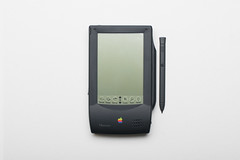
Is It Really Twenty Years Ago That I Bought A Messagepad?

Newton “Batmobile” PrototypeWired reminds us that twenty years ago this week in August 1993 Apple began selling the Newton Messagepad. The milestone is significant for me as it actually lead to some life changing events. I didn’t know it then, but my fascination with portable computing and willingness to spend nearly $1,000 on the new device would eventually lead me to realizing a dream of being a published author.

Back in 1993 I was actively working on finding a replacement for the Franklin Planner. It didn’t make sense to me to constantly re-write to-dos and other items every day as I flipped the pages of my planner. As a computer professional it made perfect sense to me to use a computer to track this type of information, unfortunately, while Sidekick did the job a PC was just too large to carry around.

For a year or so before I learned about the Messagepad I started using the Sharp Wizard and it did pretty much everything I needed it to do, but the Messagepad was so much more attractive. It had a bigger display and yes, I thought the handwriting recognition was sexy.

I remember going to a CompUSA to buy the Messagepad within the first day it went on sale, if not the first day. The Messagepads were so small that they were kept in a special secure area behind a counter, so I had to walk up and ask for one. I also remember the clerk making a comment along the lines that it was too expensive for what you got. Truth is, it was an expense I probably should not have put on my credit card, but it was the first “bleeding edge” technology I ever bought.

As the Wired article says, the handwriting recognition wasn’t perfect, but I remember it being good enough for me. You did learn how to write so that Newton recognized your handwriting. Of course, a little while after an app called Graffiti became available that provided perfect recognition but required one to write a different character set in a small dialog box for character translation. Graffiti eventually lead to Palm that lead to the real adoption of Personal Digital Assistants.

My biggest problem with the Messagepad was its shoddy synchronization with Windows. It wasn’t a surprise that Apple first released a computer synchronization tool for the Mac, but they eventually released a Windows version that never really worked as good as it should. I didn’t own a Mac, didn’t use one at work, and wasn’t going to buy one. All I wanted was to sync appointments and contacts from my PC to the Messagepad so that I didn’t have to do all that data entry.

I remember being hurt when Apple announced they were discontinuing the Messagepad. By the time that Steve Jobs killed it in 1998 the Messagepad had become an integral part of my life. Certainly, the device I was using would continue to work, in fact I am pretty sure that if I dug it out and powered it up even now it would still have all my data. However, I saw the writing on the wall, Newton would not be supported by Apple and therefore would not improve.

Looking at my options at the time, Microsoft had begun selling the Handheld PC in 1997 while the Palm Pilot began selling in 1996. I didn’t like the Graffiti recognition and the small screen on the Palm Pilot, while Windows CE provided synchronization with Windows and had the support of Microsoft. I decided to buy the HP 320 LX, even though I wasn’t enamored by its QWERTY keyboard.

Using the HP 320 LX lead me to creating a web site called the Windows CE Knowledge Center, where I consolidated links of information about Windows CE, and that along with my participation in the Windows CE Forum on MSN, lead me to be part of a small group of web site owners that Microsoft met with on a regular basis to solicit feedback and share information. Eventually that group would grow into something called Mobius, while my participation on MSN and Microsoft’s newsgroups also lead to my being recognized as a Microsoft MVP.

In the fall of 1999 I was contacted by an editor at Osborne/McGraw-Hill who had found my web site and asked whether I would be interested in writing a book. In the spring of 2000 my first book, How To Do Everything With Your Pocket PC and Handheld PC was published, and the rest, as the phrase goes, is history.

Posted in Experiences | Leave a comment

Hype Is Not The Problem, Reality Is

The reaction to the Motorola X announcement yesterday is fascinating. Most of the reaction that I have seen on Google+ and Twitter has been negative, with most of the negative comments claiming to be a reaction to hype about the Moto X but in reality in my opinion the reaction is to the price.

Part of the problem has been created by Guy Kawasaki, the father of product evangelists who held an exclusive event inviting other product evangelists like Robert Scoble, have been raising expectations by their remarks the last several weeks. Even Leo Laporte contributed to the hype with statements on his podcast.

The problem, however, is that Motorola is not failing to deliver on something it promised. I don’t think the things that Scoble and others have said about the Moto X are wrong. We don’t have a failure to deliver, what people are really complaining about is the the $199 price on contract.

Even the price itself is not the issue. I don’t think anyone seriously thinks the Moto X should cost less than $200, the problem is that people want that price without a contract and here, I think is the crux of the problem. A $200, unlocked phone, with no contract, sold from the Google Play or even the Amazon online stores is never going to outsell the same priced phones sold at AT&T, Verizon, Sprint or T-Mobile stores.

True, those of us who consider ourselves knowledgable of all things mobile recognize that the $200 one pays at the carrier stores is not the true price of the phone, with the two year contract that price is actually much, much more than $200. T-Mobile has decided to make their business plan around telling people that their competition is really ripping them off. The problem is, the majority of consumers in the United States don’t care and aren’t going to listen.

For the majority of smartphone buyers in the U.S., the $200 price they pay at AT&T is the same as the $200 price they may pay for the Moto X on the Play store. The reason is that in order to use the phone one must have a mobile plan with a carrier and the monthly price is no different for the person who buys from AT&T and from the person who buys the unlocked phone from Google or Amazon.

  • In fact, most people think that one who buys an unlocked phone for $600 is crazy. Their thinking is, you buy that phone for more and pay the same monthly service as they pay so you are really paying a higher price. True, there are several ways around this, most involving pre-paid services but I think most consumers find the prepaid service too confusing or simply have too many limitations.

The only “real” impact that people see from the contracts they sign with carriers is that they can’t switch to another carrier sooner than after two years without having to pay the carrier they signed with a large amount of money. Large meaning greater than $100. For most this isn’t a problem because they have no intention of switching carriers. By now they know whether Verizon or AT&T has be best coverage and all the carriers pretty much sell the same phones and at the same prices.

  • Number portability has taken some of the sting out of carrier switching, but I doubt people desire to hop as frequently as they once did. The desire to buy new phones is an issue and T-Mobile JUMP, and the other carriers are trying to take advantage by providing plans that in the end benefit them more than consumers.

The only way that Google could have made people truly happy is if they announced they were going to be a wireless provider and separate the monthly cost of the mobile service from the cost the phone. If Google sold a phone for $200 AND provided the same amount of talk minutes, text, and data as their competition for a lower price, then they might have something, and even still they would need to find a physical presence to sell the phone and service.

  • Keep in mind that Google’s competitors and lawyers looking to make a name of themselves are eager to pull the trigger to bring Google to court for antitrust.

A new smartphone from Google, or for that matter Apple, is not going to change what we pay for smartphones. Apple has been fighting the carriers for much longer than anyone and still the prices for the newest iPhones are in line with every other smartphone. The only way consumers are going to benefit is if the subsidized portion of what they pay each month is known and goes away once the contract period goes away.

Oh, and if you think the manufacturers might really dislike the subsidies, consider this. What happens to Apple if a person buys an iPhone 5 for $200, sticks to their contract, and then after two years sees the monthly price of their wireless service go down significantly? Consumers are going to be less interested in buying new phones as frequently because they will see the real price for doing so and will chose to hang on to their phones longer, and therefore Apple, and all the other handset manufacturers, will start selling fewer phones.

Bottom line is that if you don’t like the price of smartphones what you ought to complain about is the practice of carrier subsidies, which shift the real customer for HTC, Samsung, and Motorola smartphones from consumers to the wireless companies. The manufacturers are able to sell their phones at a fixed price with little to no pressure to lower the price so long as Verizon, AT&T, T-Mobile, and Sprint are willing to keep buying at that price. All of the wireless providers sell their phones on average for $200, with a spread of some lower and higher priced phones to even out the overall margin, and they are making a lot of money, so they aren’t going to change on their own any time soon.

Posted in Opinion | Leave a comment

Get Your Own River

The problem with the River format of displaying RSS feeds is that it is not the default setup for services like Feedly. If you are willing to simply read feeds curated by someone else, Dave provides several different topic based rivers that you can follow.

One way to create and manage your own river is to host your own using Amazon’s cloud. Dave provides instructions for creating your own Windows 2003 server hosted by Amazon that includes his software for creating your own river.

I’ve been hosting my own river of RSS feeds in this manner for several months at a cost of about $20 per month with the server running 24 x 7. Amazon provides a free Windows server instance that works pretty much the same, so if you are willing to spend a little time you can pretty easily set up your own Windows server to host your own River of news.

I chose to use a Windows server hosted by Amazon because it provides access to my news feeds from any Internet connection, but Dave’s software runs on any Windows or Mac computer and if you only use that computer then you don’t need a server on the Internet. The software includes a web server, so if you are comfortable with providing access to that computer from the Internet, you could get by without a server.

Dave recently released a new version of his River software, called River3, that provides a nice compromise. It stores the files you open to browse your RSS feeds in a public folder on Dropbox, which you can then access from any Internet connection. You can also copy the files to Amazon S3 for backup or for Internet access. While the new software uses Dropbox, if you want your feeds to be continually updated the computer hosting the software will need to be continually running.

Setting up your own River for updating and reading RSS feeds requires more work than simply turning your feeds over to a service like Feedly, but I think it is worth the extra effort. As I stated earlier, I have signed up with Feedly and have it also collecting updates, but right now I am mostly using it as an archive rather than for daily reading. I’ve grown to appreciate not feeling the pressure of checking my feeds so that they don’t pile up in my “inbox.”

If you want to set up your own EC2 Windows server and river, click here. If you are interested in River3, click here.

Posted in Experiences | Leave a comment

Inbox versus River

The primary way that users view their RSS feeds, as made popular by Google Reader, is similar to an email inbox, with new articles listed in reverse chronological order and accumulate until the user reads them or marks them as read. Dave Winer is the original author of the RSS specification and therefore has a good perspective on how RSS is used by developers and users. In Dave’s opinion articles collected through RSS should not accumulate in an inbox but rather simply display in a web page in what he calls a River format.

News Rivers collect article headline updates and display them on a web page in reverse chronological order. To see the latest articles you simply load the page, scan the article headers, and click the articles you want to read. As new articles are collected the older article headlines are pushed lower down on the page until eventually they no longer appear.

Twitter users will find the River form of reading RSS familiar because it is basically the same way that Twitter works. New Tweets appear at the top of your timeline, and you can browse through the entire timeline or just scan the latest tweets up to a point in time such as the last hour.

When I first started to use Twitter it annoyed me that I would keep seeing the same tweets either on my phone, or when I switched between my phone or notebook computer, because I had been used to the Google Reader format. After a while I grew used to the fact that I am not going to see all tweets and most likely significant items would be retweeted ane re-appear in the timeline.

Likewise, I’ve embraced the River form of reading my RSS feeds and it’s liberating to not worry about having to frequently check my RSS feed reader so that articles don’t accumulate. I find it psychologically intimidating to open an app and see hundreds of unread articles, even if there is a way to simply mark all the articles as being read, even if I didn’t read them.

If you are one of the many people who has moved your RSS subscriptions from Google Reader to another app like Feedly, I suggest considering a fresh start on how you use RSS and consider dipping in the River just when you want to see the latest news and stop worrying about keeping up.

Posted in Experiences | Leave a comment

There Is Still Time To Back Up Your Google Reader Subscriptions

Chances are good that because you are reading this blog post you know that Google Reader has been shut down. Several months ago Google announced that they were shutting down a number of different apps and services to focus their people on more productive work. Reader, which has been Google’s RSS feed reader, is one of the apps that has been shut down.

Since Google announced Reader’s demise, several other companies such as Feedly, Digg, and AOL announced and developed alternatives in the hopes the people who have been using Reader will pick their service. Of the services I list above, I chose to use Feedly because it existed prior to Google’s announcement and therefore seems to me to be the most mature.

If you use Google Reader what is important right now is not so much picking one of these services as is saving a backup of your RSS subscription list. Dave Winer has written instructions for how to download a copy of your subscriptions and store them on Dropbox in a place where you can open the file using his new outlining tool called Fargo. You don’t have to do the part about Dropbox and Fargo, athough I personally recommend trying Fargo if you do any writing, but you should at least download your subscription list.

I just checked, and at least for now one still has the ability to download their RSS subscription list using the link that Dave provides.

Posted in Experiences | Leave a comment